Introduction
ExacqVision can delete recorded video based on either (1) a target retention age (days) or (2) available disk space. Understanding which mechanism that is active helps distinguish normal overwrite behavior from suspicious or unexpected deletions.
Problem
Administrators notice recorded video disappearing sooner than expected and need to know whether this is expected (retention/overwrite) or suspicious (manual deletion, drive issues, or misconfiguration).
Cause
Retention is affected by storage configuration: The Storage window shows the age of the oldest recorded video and allows setting retention periods and per-camera expiration rules. Separately, the Video Space setting controls how much of each drive is used for recordings, which can cause oldest footage to be overwritten when space is consumed. Bookmarks can also change retention behavior because they do not delete automatically unless total bookmark size exceeds storage capacity.
Solution
Use the steps below to identify which retention behavior is expected on your system and what signs indicate suspicious deletion. Always confirm your Storage configuration, camera recording load (bitrate/fps/resolution), and whether bookmarks or expiration rules apply.
Step-by-step (summarized)
- In exacqVision Client, open Config (Setup) → Storage → Drive tab and record “Oldest recorded video” (Content Age).

- Identify if you are enforcing an age requirement using Expiration Configuration (per-camera minimum/maximum storage periods).
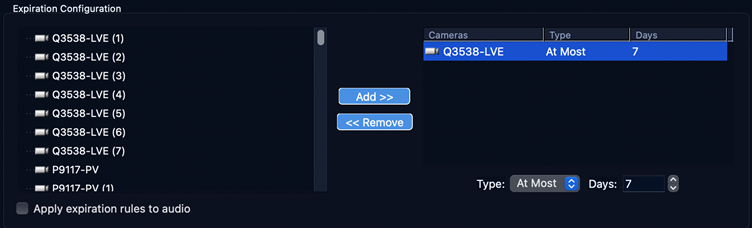
- Check each storage drive’s Video Space allocation and free space. Space-based overwrite occurs when allocated space is full.

- Check for bookmarks: bookmarks do not delete automatically unless their total size exceeds capacity; bookmarked footage can reduce available space.

- Expected behaviour: when space is full, oldest unprotected footage is overwritten first; Content Age will drop as load increases.
- Suspicious indicators: sudden large gaps, drops in Content Age without recording changes, video missing outside expected overwrite window, or storage health errors.
| Mode | What deletes video | Expected signs | Suspicious signs |
| Age-based (expiration) | Expiration rules delete video after a configured period (per-camera min/max). | Video older than the configured limit is removed; behavior is consistent and predictable. | Video newer than the configured limit disappears; deletion happens on only some cameras without matching rules. |
| Space-based (overwrite) | When allocated Video Space is consumed, oldest footage is overwritten. | Oldest Content age decreases as load increases; drives remain healthy and usage is near allocation. | Sudden loss of large time ranges, especially if disk usage is not near full; missing footage coincides with drive errors or manual file changes. |
| Bookmarks | Bookmarks persist and are not auto-deleted unless total bookmark size exceeds capacity. | Retention age is lower than expected because bookmarks consume space. | Large retention drops after bookmark spikes or bookmark storage unexpectedly cleared. |