Support has been added to exacqVision 26.0 to conform with the updated guidelines for ONVIF Profile T. This enhancement certifies exacqVision Client for ONVIF Profile T, ensuring comprehensive compatibility with a wide range of ONVIF-compliant cameras. This release also adds support for secure video streaming via HTTPS, enhancing data protection and aligns exacqVision with industry standards for advanced IP video systems.
Customer Benefits
- Broader Camera Compatibility: Connect seamlessly with ONVIF Profile T cameras from leading manufacturers
- Market Confidence: Certification boosts trust and credibility with enterprise customers and integrators
- Secure Streaming: HTTPS support ensures encrypted communication between cameras and clients
- Future-Proofing: Aligns with evolving ONVIF standards, making exacqVision a safer long-term investment
- Sales Enablement: Certified listing improves positioning in RFPs and large-scale deployments
ONVIF Profile T
Profile T is designed for IP-based video systems. Profile T supports video streaming features such as the use of H.264 and H.265 encoding formats, imaging settings, and alarm events such as motion and tampering detection. Mandatory features for devices also include onscreen display and metadata streaming, while mandatory features for clients also include PTZ control. Profile T also covers ONVIF specifications for HTTPS streaming, PTZ configuration, motion region configuration, digital inputs and relay outputs, and bidirectional audio for conformant devices and clients that support such features.
Procedure
When adding a camera to exacqVision Client, users can select either HTTP, HTTPS Required or HTTPS Required with Certificate Validation from the Protocol dropdown.
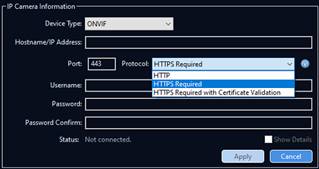
Now when adding a camera via CSV, Manually or by discovery, by default camera protocol will be set to HTTPS Required, which the user can change if needed.