Enterprise Manager Installation Fails Due to Residual PostgreSQL Components on Windows Systems

Description

On Windows systems, the Enterprise Manager (EM) installer may fail even on fresh installations when orphaned remnants of previous PostgreSQL components remain.

Problem

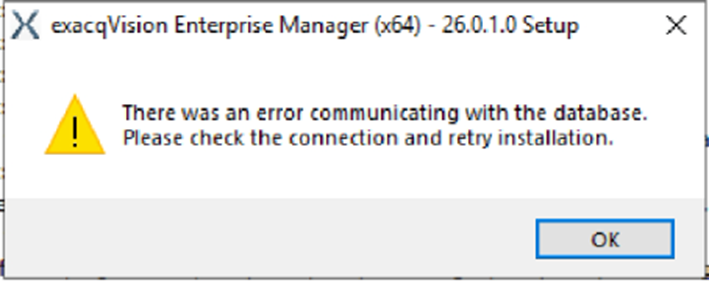
The Enterprise Manager installer will detect remnant/orphaned files, often from previous installation attempts, and proceed with attempting Postgres updates instead of Postgres new installation/DB, eventually likely resulting in the following error dialogue during installation:

Products Affected

All versions of exacqVision Enterprise Manager for Windows using PostgreSQL databases.
Solution

Remove Lingering PostgreSQL Components (Windows Only):


1. Stop and Delete PostgreSQL Services

Run PowerShell as Administrator:

Get-Service *postgres* | Stop-Service -Force -ErrorAction SilentlyContinue
Get-Service *postgres* | ForEach-Object { sc.exe delete $_.Name }

2. Remove PostgreSQL Registry Keys

Remove-Item -Path "HKLM:\SOFTWARE\PostgreSQL" -Recurse -Force -ErrorAction SilentlyContinue

3. Then remove uninstall entries:

$keys = @(
"HKLM:\Software\Microsoft\Windows\CurrentVersion\Uninstall\*",
"HKLM:\Software\WOW6432Node\Microsoft\Windows\CurrentVersion\Uninstall\*"
)

foreach ($keyPath in $keys) {
    Get-ItemProperty $keyPath -ErrorAction SilentlyContinue |
      Where-Object { $_.DisplayName -match "PostgreSQL" } |
      ForEach-Object { Remove-Item $_.PSPath -Recurse -Force }
}

4. Delete PostgreSQL Installation Directories

$paths = @(
"C:\Program Files\PostgreSQL",
"C:\Program Files (x86)\PostgreSQL",
"C:\ProgramData\PostgreSQL",
"$env:APPDATA\PostgreSQL",
"$env:LOCALAPPDATA\PostgreSQL"
)

foreach ($path in $paths) {
    if (Test-Path $path) {
        Remove-Item $path -Recurse -Force
    }
}

5. Remove PostgreSQL PATH Entries

$newPath = ($env:Path -split ";" | Where-Object { $_ -notmatch "PostgreSQL" }) -join ";"
[Environment]::SetEnvironmentVariable("Path", $newPath, [EnvironmentVariableTarget]::Machine)
[Environment]::SetEnvironmentVariable("Path", $newPath, [EnvironmentVariableTarget]::User)

6. Reboot the Windows EM/Postgres Server Host.

A reboot ensures all PostgreSQL-related handles and services unload fully.

  EMfailsduetoorphanedpostgresqlfiles.pdf